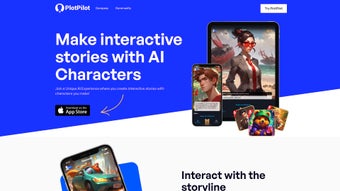

Download PlotPilot – AI Audiobook Creator, Free & Secure iOS App
Introduction: Turning Story Ideas into Immersive Audiobooks
In today’s media landscape, audio content is overtaking text as the preferred way people consume stories, lessons, and entertainment. PlotPilot answers that shift by offering an AI‑driven engine that converts a short text prompt into a fully narrated, professionally mixed audiobook—all from a single iPhone, iPad, Apple Watch, or Mac. The app’s core promise is simplicity: you type a few sentences, choose a voice, and let the cloud do the heavy lifting.
No microphone recordings, no external editing software, and no need to hire voice talent. The underlying neural‑network model has been trained on thousands of commercially released audiobooks, so it understands genre‑specific pacing, tone, and emotional cadence. Whether you are a novelist sketching a prototype, an educator turning lesson plans into engaging audio lessons, or a podcaster looking for filler content, PlotPilot provides a secure, fast, and affordable pathway from concept to finished product.
A free tier lets users generate short samples, while subscription plans unlock unlimited minutes, premium voices, and advanced customization options. Future updates promise multilingual support, deeper interactivity, and eventual expansion to Android and Windows platforms. By removing technical barriers, PlotPilot empowers creators of all skill levels to hear their stories come alive with just a few taps.
Core Features that Set PlotPilot Apart
Feature List
- AI‑driven genre and mood detection that automatically matches narration style.
- More than 40 distinct synthetic voices, including gender‑balanced and accented selections.
- Dynamic ambient soundscapes that adapt to the narrative’s emotional beats.
- Interactive chapter endings that let listeners choose the next plot direction.
- One‑click generation of full‑length audiobooks from a simple text prompt.
- Free version with limited generation and tiered subscription plans for unlimited use.
- Cross‑device synchronization between iPhone, iPad, Apple Watch, and macOS.
- Secure cloud processing that never stores personal story data permanently.
- Future‑ready multilingual support slated for upcoming releases.
- Regular updates that improve voice quality and add new sound libraries.
Beyond the headline‑grabbing capabilities, PlotPilot’s architecture is built on a robust neural‑network model that not only produces natural‑sounding speech but also respects the pacing conventions unique to each genre. A thriller receives rapid, breath‑shortened delivery, while a romance enjoys a slower, breathy cadence. The interactive chapter feature transforms passive listening into a choose‑your‑own‑adventure experience, encouraging repeat plays and higher listener retention.
Because all processing occurs in the cloud, even older iOS devices generate audiobooks in minutes without draining the battery. Subscription tiers are transparent: the basic plan offers a set number of minutes per month, while the premium tier provides unlimited generation, exclusive premium voices, and priority processing during peak times. An integrated analytics dashboard shows play counts per chapter, giving writers actionable feedback on which plot points resonate most.
These features combine to make PlotPilot not just a novelty, but a serious productivity tool for anyone looking to expand their storytelling toolbox.
Step‑by‑Step Installation and Usage Guide
Getting started with PlotPilot is deliberately straightforward, reflecting the app’s mission to eliminate technical barriers. First, open the App Store on your iPhone, iPad, or Mac and search for “PlotPilot.” Tap “Get” to download the free version; the app’s size is under 120 MB, so it installs quickly even on slower connections. Once installed, launch PlotPilot and grant the necessary permissions for microphone access (used only for optional voice recordings) and cloud storage (for temporary processing files). The onboarding wizard walks you through creating a user profile—simply provide an email address or use Apple Sign‑In for a seamless experience. After registration, you’ll land on the main dashboard where a prominent “Create New Audiobook” button awaits.
To generate an audiobook, click the button and enter a concise description of your story. For example, type “A teenage wizard discovers a hidden portal in her school library and must decide whether to protect it or reveal it to the world.” PlotPilot’s AI instantly analyses the input, identifies the fantasy genre, and suggests a suitable voice—perhaps a warm, youthful male narrator with a hint of mystique. You can preview three sample voice snippets before confirming. Once you select a voice, hit “Generate.” The cloud engine takes roughly 2–3 minutes per ten‑minute chapter, after which the finished audio appears in your library with a thumbnail that reflects the chosen mood.
The app also offers editing controls for fine‑tuning. Under the “Settings” tab, you can adjust volume levels for narration versus ambient sounds, enable or disable background music, and set a maximum chapter length. For the interactive component, PlotPilot automatically adds a decision point at the end of each chapter; you can edit the choice text or let the AI suggest branching paths.
When satisfied, tap “Export” to save the file to your device, share it via AirDrop, or publish directly to popular podcast platforms using the built‑in RSS feed generator. Finally, keep the app updated—PlotPilot releases minor patches monthly that improve voice realism and add new sound effects. By following these steps, users can go from a raw idea to a polished, interactive audiobook in under an hour, all without touching a single audio editing tool.
Conclusion, Compatibility, Pros & Cons, and FAQ
Operating System Support
PlotPilot runs on iOS 14.0 or later, including iPadOS, and is fully compatible with Apple Watch watchOS 7+. Through Apple’s Catalyst technology, a macOS version (Big Sur and later) is also available, allowing creators to work on a larger screen while still leveraging the same cloud‑based processing engine. The app does not require a constant internet connection after the initial generation, but a stable Wi‑Fi or cellular link is needed for the AI processing step. All data is encrypted in transit, and PlotPilot complies with Apple’s App Store privacy guidelines, ensuring that user‑generated content remains confidential.
Pros
- Instant AI‑driven audiobook generation from minimal text input.
- Extensive library of 40+ voices with diverse accents and tones.
- Interactive chapter endings that boost listener engagement.
- Cross‑device sync enables seamless work on iPhone, iPad, Apple Watch, and Mac.
- Free tier lets users test the concept before committing to a subscription.
- Secure cloud processing with no permanent storage of user stories.
- Regular updates introduce new features, languages, and higher‑quality voices.
Cons
- Currently limited to Apple’s ecosystem; no native Android or Windows version.
- Premium voices and unlimited generation require a paid subscription.
- Complex narratives may need multiple prompts to capture all plot nuances.
- Audio export options are limited to standard formats (MP3, AAC).
- Interactive branching is automated and may lack the depth of hand‑crafted scripts.
PlotPilot delivers a seamless AI‑powered audiobook creation experience with impressive voice variety, interactive storytelling, and a free entry point that lets creators experiment without risk.
Pros (review)
- Fast generation from short prompts.
- High‑quality synthetic voices.
- Interactive chapter feature.
- Cross‑device synchronization.
- Strong privacy safeguards.
Cons (review)
- Apple‑only availability.
- Full feature set locked behind subscription.
- Limited export formats.
How many voice options does PlotPilot provide?
PlotPilot currently offers more than 40 distinct synthetic voices, covering a range of genders, ages, and accents, allowing creators to match the narrator to the story’s tone.
Can I use PlotPilot on a Windows PC?
At the moment PlotPilot is exclusive to Apple’s ecosystem (iOS, iPadOS, watchOS, and macOS). The development team has hinted at possible cross‑platform expansion, but no official Windows version exists yet.
Is the free version limited to a certain number of minutes?
Yes, the free tier lets you generate up to 10 minutes of audio per month, which is ideal for testing the service and creating short samples before upgrading.
How does PlotPilot handle data privacy?
All story data is transmitted over encrypted connections and processed in temporary cloud storage. PlotPilot does not retain personal content after the audiobook is generated, complying with Apple’s privacy standards.
Will PlotPilot support languages other than English?
Future updates are slated to introduce multilingual capabilities, starting with Spanish, French, and German, enabling creators worldwide to generate audiobooks in their native languages.



.png)



